Go beyond the basics — Hackingtons Pro

Live online sessions where kids build real projects — games, apps, and tools they can actually show off.

Ages 8–18 Python & JavaScript Unity Game Dev 1×/week · 70 min $140/mo
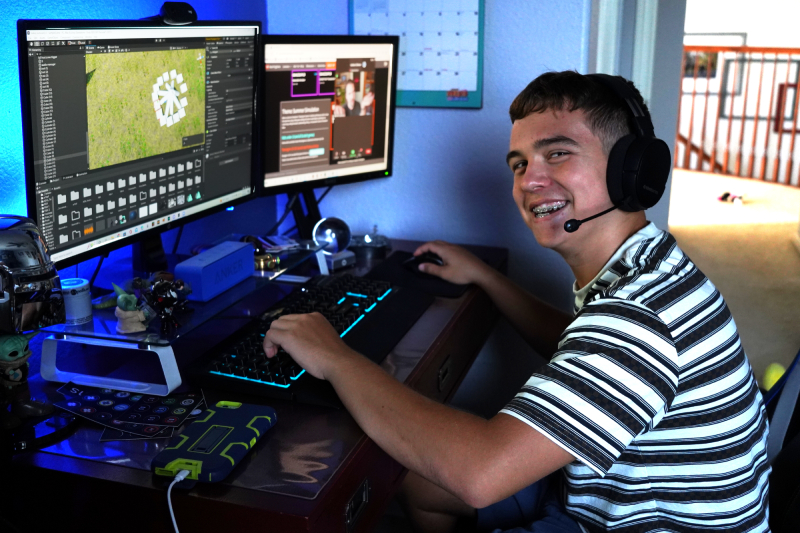
Students building projects at Hackingtons Pro
Parent profile
Cathleen · Hackingtons parent
Rated 5 stars

"He loves it more than anything he's ever done."
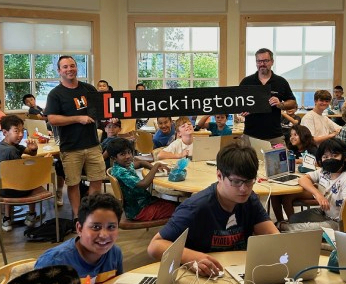
Students building projects at Hackingtons Pro

They don't just learn to code — they ship real projects.

Games on Steam. Apps that work. Projects they demo to peers every week.

Getting started is easy

Three steps — no commitment until you're ready.

1

Meet Michael

A quick parent call to talk about your child's goals and find the right session.

2

Attend a free class

Your child joins a live session — no payment, no strings. Just show up and build.

3

See if it's a fit

If your child loved it, pick a weekly session. If not — no pressure at all.

How we create belonging

Consistent groups

Same kids each week

Real projects

Build things worth showing off

Mentor teachers

Guidance + confidence

Showcases & events

Progress is celebrated

Online class start times (Pacific Time Zone)

Live 70‑minute sessions · 1×/week
Mon Tue Wed Thu Sat
4:45pm4:45pm4:45pm4:45pm9:00am
6:00pm6:00pm6:00pm6:00pm10:20am

Most sessions have 2–4 spots open. Don't see a time that fits? Email us — we'll help find the right fit.

Meet Michael

UCLA Graduate and avid programmer, Michael and his team of instructors are here to help your child jumpstart their future careers in tech.

What a week feels like

Every session has a rhythm: quick check-in, focused build time, then a mini-showcase so students leave proud. Pro sessions move faster and go deeper than standard classes.

Kids don't just learn concepts — they ship real projects, debug tough problems, and present their work to peers. Over time, that becomes identity: "I build things."

Tuition is $140/month. Sessions meet once per week for 70 minutes via live video.

At a Glance

BELONGING

New kids aren't "the new kid" for long

Sessions are welcoming by design: quick intros, partner builds, and weekly sharing that makes conversation easy.

MOMENTUM

Progress is visible every week

Kids leave with something that works: a game mechanic, a working feature, a prototype. Every project ends up in the showcase.

PRIDE

Showcase builds confidence

Students learn to explain what they built—and get celebrated for effort, not just "being smart."

Meet Michael — free parent meeting

Talk with Michael about your child's goals, experience level, and which Pro session is the right fit. No pressure — just a conversation.

Want help finding the right session?

Tell us a little about your child and we'll reach out with a good fit.

How sessions work

Each session has three parts: quick check-in, focused build time, and a showcase. Students complete meaningful work and share it every week.

Students sharing projects at Hackingtons
Classes meet online, but your child will be part of something bigger.

Belonging promise

If your child doesn't click with their session in the first 3 weeks, tell us. We'll switch groups or times until we find the right fit—no hassle, no extra cost.

Kids feel at home here

"Hackingtons brings people together over coding with funny and inspirational teachers..."

— Celia, 11

"I've attended many coding programs, but only Hackingtons focused on building practical applications for the real world."

— Yaroslav, 15

What parents tell us:

  • "My kid finally found friends who like the same things."
  • "He built a working game and showed his grandparents on Zoom."
  • "They talk about their projects at dinner."
  • "Confidence is the biggest change—he actually presents now."

Yes, they actually ship

  • Students published a real game on Steam
  • Annual Hackingtons500 competition with 100+ participants
  • Every student project lives in the showcase — games, apps, and tools made by kids

Frequently asked questions

Quick answers to what parents ask us most.

Who is Hackingtons Pro for?

Pro is for kids ages 8–18 who want to go above and beyond the standard Hackingtons curriculum. Maybe they've outgrown intro-level classes, want to tackle bigger projects, or just thrive when they're challenged. Some are experienced coders, others are ambitious beginners — we meet them where they are and push them further.

Does my child need prior coding experience?

No. Many of our students start with zero experience. We place students in the right starting point and help them progress at a comfortable pace through our belt system.

What happens in the placement meeting?

This is a short online meeting with you, your child, and one of our instructors. We’ll learn about your child’s interests, walk you through how classes work, answer questions, and recommend the best starting track (Python, web, Scratch, Unity, etc.).

How do online classes actually work?

Classes meet once per week for 70 minutes in a small group. A mentor instructor helps each student stay focused on building an individualized assignment from the Hackingtons curriculum. Students share their progress with the class in a weekly stduent showcase.

What equipment do we need at home?

A computer (Mac, Windows, or Chromebook for most tracks), a reliable internet connection, and a quiet place to work. A mouse and headset are helpful but not required.

Is there help outside of class time?

The Hackingtons curriculum is unique to our program and students have access to it 24/7 from home. They can submit projects for evaluation and ask questions outside of class hours.

What does membership cost and what’s included?

Membership is $140/month and includes one 70‑minute live session per week, plus access to ongoing projects and challenges. During your Child Success Meeting, we’ll go over options and any details about billing or changes.

What if my child needs to miss a class?

Life happens. If your child has to miss a session, just email us and we’ll go over options and help keep them schedule a make-up class.

See if Pro is right for your child.

Meet Michael. Talk through goals. No commitment.

Book a Free Parent Meeting